<?xml version="1.0" encoding="utf-8"?>
<feed xmlns="http://www.w3.org/2005/Atom">

  <title><![CDATA[//jerrywalsh.org]]></title>
  <link href="http://jerrywalsh.org/atom.xml" rel="self"/>
  <link href="http://jerrywalsh.org/"/>
  <updated>2013-05-15T22:38:58+01:00</updated>
  <id>http://jerrywalsh.org/</id>
  <author>
    <name><![CDATA[Jerry Walsh]]></name>
    
  </author>
  <generator uri="http://octopress.org/">Octopress</generator>

  
  <entry>
    <title type="html"><![CDATA[Your Phone Company Is Watching You]]></title>
    <link href="http://jerrywalsh.org/2012/your-phone-company-is-watching-you-1227.html"/>
    <updated>2012-12-27T19:17:00+00:00</updated>
    <id>http://jerrywalsh.org/2012/your-phone-company-is-watching-you</id>
    <content type="html"><![CDATA[<p>Malte Spitz, a member of Germany’s Green Party, sued his mobile phone provider to reveal what records it kept about him.  The records including tracking data based on rough triangulation from the nearest cell-phone towers.  Spitz then sent this information to Zeit Online, who combined it with Spitz’ personal blog and Twitter entries to produce an incredible animated map that reveals a surprisingly detailed account of his movements over a six-month period.</p>

<p>To reiterate, this was done all without GPS services and without Spitz requesting his movements be tracked — it was automatically generated simply by his mobile phone communicating with cell phone towers.  It very much goes to show the importance of regulations that limit retention periods for this kind of data, given how detailed a reconstruction can be made of an individual’s life.</p>

<div class="embed video YouTube"><iframe width="480" height="270" src="http://www.youtube.com/embed/Gv7Y0W0xmYQ?feature=oembed" frameborder="0" allowfullscreen></iframe></div>

]]></content>
  </entry>
  
  <entry>
    <title type="html"><![CDATA[TextBuddy is no more! It was fun while it lasted y'all..]]></title>
    <link href="http://jerrywalsh.org/2012/textbuddy-is-no-more-it-was-fun-while-it-lasted-dot-1002.html"/>
    <updated>2012-10-02T16:39:00+01:00</updated>
    <id>http://jerrywalsh.org/2012/textbuddy-is-no-more-it-was-fun-while-it-lasted-dot</id>
    <content type="html"><![CDATA[<p>TextBuddy was created to make it easy for people to actually utilize the
Webtext allowances providers gave them. In the last few weeks some providers
(namely O2 and Vodafone) have begun making changes to their webtext pages in order to
make it more difficult (but not impossible) for applications such as TextBuddy from operating.
Unfortunately it&#8217;s just not worth trying to integrate with providers who don&#8217;t want you
integrating with them.</p>

<p>If this move leaves you high and dry then perhaps something like <a href="http://www.cabbagetexter.com/">Cabbage
Texter</a> will work instead?</p>

<p>Thanks for using TextBuddy!</p>
]]></content>
  </entry>
  
  <entry>
    <title type="html"><![CDATA[Joe Rogan's American War Machine]]></title>
    <link href="http://jerrywalsh.org/2012/joe-rogans-american-war-machine-0123.html"/>
    <updated>2012-01-23T14:22:00+00:00</updated>
    <id>http://jerrywalsh.org/2012/joe-rogans-american-war-machine</id>
    <content type="html"><![CDATA[<p>A very cool combination of some rants from Joe Rogan:</p>

<div class="embed video YouTube"><iframe width="480" height="270" src="http://www.youtube.com/embed/jl2JQfxnnHU?feature=oembed" frameborder="0" allowfullscreen></iframe></div>

]]></content>
  </entry>
  
  <entry>
    <title type="html"><![CDATA[HOWTO secure your linux box with IPTABLES]]></title>
    <link href="http://jerrywalsh.org/2012/howto-secure-your-linux-box-with-iptables-0112.html"/>
    <updated>2012-01-12T00:22:00+00:00</updated>
    <id>http://jerrywalsh.org/2012/howto-secure-your-linux-box-with-iptables</id>
    <content type="html"><![CDATA[<p>Okay, so this post will be brief but to the point. Today
I needed to lock down a machine I administer so the only inbound connections
which were allowed were SSH connections from trusted hosts.
I&#8217;m using Debian so this will obviously work for other Debian based distros such as Ubuntu, Linux Mint etc.</p>

<p>Assuming you&#8217;re running a current version of Debian or a derivative then iptables will already be present on your system. One of the first things to
take note is that iptables won&#8217;t hold its ruleset during a reboot so to start off this tutorial the first thing I ensured was
that the ruleset will be restored when the machine is rebooted.  So, <em>as root</em> I edited <code>/etc/rc.local</code> and before the exit line i added <code>/etc/iptables-init</code>. Because this was a fresh install my rc.local ended up looking like this:</p>

<figure class='code'><figcaption><span>/etc/rc.local from Debian 6</span></figcaption><div class="highlight"><table><tr><td class="gutter"><pre class="line-numbers"><span class='line-number'>1</span>
<span class='line-number'>2</span>
<span class='line-number'>3</span>
<span class='line-number'>4</span>
<span class='line-number'>5</span>
<span class='line-number'>6</span>
<span class='line-number'>7</span>
<span class='line-number'>8</span>
<span class='line-number'>9</span>
<span class='line-number'>10</span>
<span class='line-number'>11</span>
<span class='line-number'>12</span>
<span class='line-number'>13</span>
<span class='line-number'>14</span>
<span class='line-number'>15</span>
<span class='line-number'>16</span>
</pre></td><td class='code'><pre><code class='sh'><span class='line'><span class="c">#!/bin/sh -e</span>
</span><span class='line'><span class="c">#</span>
</span><span class='line'><span class="c"># rc.local</span>
</span><span class='line'><span class="c">#</span>
</span><span class='line'><span class="c"># This script is executed at the end of each multiuser runlevel.</span>
</span><span class='line'><span class="c"># Make sure that the script will &quot;exit 0&quot; on success or any other</span>
</span><span class='line'><span class="c"># value on error.</span>
</span><span class='line'><span class="c">#</span>
</span><span class='line'><span class="c"># In order to enable or disable this script just change the execution</span>
</span><span class='line'><span class="c"># bits.</span>
</span><span class='line'><span class="c">#</span>
</span><span class='line'><span class="c"># By default this script does nothing.</span>
</span><span class='line'>
</span><span class='line'><span class="c"># Setup iptables</span>
</span><span class='line'>/etc/iptables-init
</span><span class='line'><span class="nb">exit </span>0
</span></code></pre></td></tr></table></div></figure>


<p>Next, I created the script which we&#8217;ve setup to be executed from rc.local:</p>

<figure class='code'><figcaption><span>/etc/iptables-init </span></figcaption><div class="highlight"><table><tr><td class="gutter"><pre class="line-numbers"><span class='line-number'>1</span>
<span class='line-number'>2</span>
<span class='line-number'>3</span>
<span class='line-number'>4</span>
<span class='line-number'>5</span>
<span class='line-number'>6</span>
<span class='line-number'>7</span>
<span class='line-number'>8</span>
<span class='line-number'>9</span>
<span class='line-number'>10</span>
<span class='line-number'>11</span>
<span class='line-number'>12</span>
<span class='line-number'>13</span>
<span class='line-number'>14</span>
<span class='line-number'>15</span>
<span class='line-number'>16</span>
<span class='line-number'>17</span>
<span class='line-number'>18</span>
<span class='line-number'>19</span>
<span class='line-number'>20</span>
<span class='line-number'>21</span>
<span class='line-number'>22</span>
<span class='line-number'>23</span>
<span class='line-number'>24</span>
<span class='line-number'>25</span>
<span class='line-number'>26</span>
<span class='line-number'>27</span>
<span class='line-number'>28</span>
<span class='line-number'>29</span>
<span class='line-number'>30</span>
<span class='line-number'>31</span>
<span class='line-number'>32</span>
<span class='line-number'>33</span>
<span class='line-number'>34</span>
<span class='line-number'>35</span>
<span class='line-number'>36</span>
<span class='line-number'>37</span>
<span class='line-number'>38</span>
<span class='line-number'>39</span>
<span class='line-number'>40</span>
<span class='line-number'>41</span>
<span class='line-number'>42</span>
<span class='line-number'>43</span>
<span class='line-number'>44</span>
<span class='line-number'>45</span>
<span class='line-number'>46</span>
<span class='line-number'>47</span>
</pre></td><td class='code'><pre><code class='sh'><span class='line'><span class="c">#!/bin/sh</span>
</span><span class='line'><span class="c"># ----------------------------------------------------------------------</span>
</span><span class='line'><span class="c"># simple but secure iptables initialization script</span>
</span><span class='line'><span class="c"># DateCreated: Thu 12 Jan 2012 00:37:04 GMT</span>
</span><span class='line'><span class="c"># Author: Jerry Walsh</span>
</span><span class='line'><span class="c"># ----------------------------------------------------------------------</span>
</span><span class='line'>
</span><span class='line'><span class="c"># Put your trusted hosts/ranges here:</span>
</span><span class='line'><span class="nv">TRUSTED_HOSTS</span><span class="o">=</span><span class="s2">&quot;1.2.3.4 8.8.8.8/24 \</span>
</span><span class='line'><span class="s2">  4.3.2.1 1.2.2.2 3.3.3.4 &quot;</span>
</span><span class='line'>
</span><span class='line'><span class="c"># flush rules</span>
</span><span class='line'>iptables -F
</span><span class='line'>
</span><span class='line'><span class="c"># Log dropped connections</span>
</span><span class='line'><span class="c">#iptables -N LOGDROP</span>
</span><span class='line'>
</span><span class='line'><span class="c"># allow localhost connections to the loopback interface </span>
</span><span class='line'>iptables -A INPUT -i lo -j ACCEPT
</span><span class='line'>iptables -A INPUT ! -i lo -d 127.0.0.0/8 -j REJECT
</span><span class='line'>
</span><span class='line'><span class="c"># allow connections which are already established</span>
</span><span class='line'>iptables -A INPUT -m state --state ESTABLISHED,RELATED -j ACCEPT
</span><span class='line'>
</span><span class='line'><span class="c"># allow all outbound connections</span>
</span><span class='line'>iptables -A OUTPUT -j ACCEPT
</span><span class='line'>
</span><span class='line'><span class="c"># allow tcp to port 22 (ssh daemon) from trusted hosts</span>
</span><span class='line'><span class="k">for </span>GOODIE in <span class="nv">$TRUSTED_HOSTS</span>; <span class="k">do</span>
</span><span class='line'><span class="k">  </span>iptables -A INPUT -p tcp -m state --state NEW -s <span class="nv">$GOODIE</span> --dport 22 -j ACCEPT
</span><span class='line'><span class="k">done</span>
</span><span class='line'><span class="c"># or you could just allow ssh access from all hosts</span>
</span><span class='line'><span class="c"># NOTE: if you&#39;re going to allow ssh access from all hosts then</span>
</span><span class='line'><span class="c"># it&#39;s always a good idea to put sshd on a non-standard port</span>
</span><span class='line'><span class="c"># - this keeps the majority of script kid trawlers out</span>
</span><span class='line'><span class="c">#iptables -A INPUT -p tcp -m state --state NEW --dport 22 -j ACCEPT</span>
</span><span class='line'>
</span><span class='line'><span class="c">#other optional extras:</span>
</span><span class='line'><span class="c"># allow inbound http access</span>
</span><span class='line'><span class="c">#iptables -A INPUT -p tcp -m state --state NEW --dport 80 -j ACCEPT</span>
</span><span class='line'><span class="c"># allow inbound https access</span>
</span><span class='line'><span class="c">#iptables -A INPUT -p tcp -m state --state NEW --dport 443 -j ACCEPT</span>
</span><span class='line'>
</span><span class='line'><span class="c"># drop all other inbound traffic (including ICMP, UDP etc.)</span>
</span><span class='line'>iptables -A INPUT -j DROP
</span><span class='line'><span class="c"># you could also just block tcp connections..</span>
</span><span class='line'><span class="c">#iptables -A INPUT -p tcp -j DROP</span>
</span></code></pre></td></tr></table></div></figure>


<p>Finally, I set the script executable and executed the script now to load the new rules in to iptables:</p>

<figure class='code'><figcaption><span>finally, we mark the script executable and run it!</span></figcaption><div class="highlight"><table><tr><td class="gutter"><pre class="line-numbers"><span class='line-number'>1</span>
<span class='line-number'>2</span>
</pre></td><td class='code'><pre><code class='sh'><span class='line'>chmod 0700 /etc/iptables-init
</span><span class='line'>!<span class="err">$</span>
</span></code></pre></td></tr></table></div></figure>


<p>And that&#8217;s it! Remember - it&#8217;s always good to
test your configuration from a remote host or
better still from a &#8216;bad&#8217; remote host and a
&#8216;good&#8217; (whitelisted) host.</p>

<p>REMEMBER: The above script is just an example!
You should modify the script to meet YOUR needs
(as it stands this met mine) but it still serves
as a useful starting point. It should also be
noted that ICMP ping replies will be blocked
using the above setup - this may not be
desirable but in my case it was!</p>

<p>I&#8217;ll leave you with &#8216;Another Day&#8217; from Album
Leaf:</p>

<div class="embed video YouTube"><iframe width="459" height="344" src="http://www.youtube.com/embed/JjHrtwOQ6g4?feature=oembed" frameborder="0" allowfullscreen></iframe></div>


]]></content>
  </entry>
  
  <entry>
    <title type="html"><![CDATA[John Cleese on Creativity]]></title>
    <link href="http://jerrywalsh.org/2012/john-cleese-on-creativity-0107.html"/>
    <updated>2012-01-07T19:17:00+00:00</updated>
    <id>http://jerrywalsh.org/2012/john-cleese-on-creativity</id>
    <content type="html"><![CDATA[<p>There&#8217;s no doubt about it that <a href="https://en.wikipedia.org/wiki/John_Cleese">John Cleese</a> is a genius when it comes to comedy but
his genius-ness (is that even a word?) doesn&#8217;t stop there. What follows is one of my favourite videos
from him. The highlight of which is this enlightening little piece of wisdom:</p>

<blockquote><p> To know how good you are at something requires the same skills as it does to be good at those things.
 Which means if you&#8217;re absolutely hopeless at something, you lack exactly the skills that you need to know that you&#8217;re absolutely hopeless at it.
 And this is a profound discovery - that most people who have absolutely no idea
 what they&#8217;re doing, have absolutely no idea that they have no idea what they&#8217;re
 doing.</p>

<p>It explains a great deal of life.</p>

<p>&#8230;</p>

<p>It also explains why so many people in charge of so many organisations have no idea what they&#8217;re doing, they have a terrible blind spot.</p></blockquote>

<p>Watch the video here:</p>

<div class="embed video YouTube"><iframe width="480" height="270" src="http://www.youtube.com/embed/zGt3-fxOvug?feature=oembed" frameborder="0" allowfullscreen></iframe></div>


<p>I&#8217;ve decided that it&#8217;ll now be customary to sign off each post with a bit of
music. In this case, given that it&#8217;s the weekend it&#8217;ll be some uplifting vocal trance from <a href="https://en.wikipedia.org/wiki/Andain">Andain</a>, the Myon and Shane 54 remix of &#8216;Promises&#8217;. Enjoy! (and sorry if this doesn&#8217;t float your boat :P):</p>

<div class="embed video YouTube"><iframe width="480" height="270" src="http://www.youtube.com/embed/xgcjjdSOjf0?feature=oembed" frameborder="0" allowfullscreen></iframe></div>

]]></content>
  </entry>
  
  <entry>
    <title type="html"><![CDATA[Finally, I got my site in order!]]></title>
    <link href="http://jerrywalsh.org/2012/finally-got-around-to-updating-my-site-0105.html"/>
    <updated>2012-01-05T16:47:00+00:00</updated>
    <id>http://jerrywalsh.org/2012/finally-got-around-to-updating-my-site</id>
    <content type="html"><![CDATA[<p>I know, I know.. it&#8217;s been long overdue and I&#8217;ve just been putting it off for far too long. A recent trip to <a href="http://www.zellamsee-kaprun.com/en">Zell Am See</a>, in Austria recently
gave me enough downtime to focus on revamping the site which is now complete. I think everything should be working OK but if you encounter problems then please <a href="http://jerrywalsh.org/contact/">let me know</a>. I hope the new look will get me blogging more often and with higher quality!</p>

<p>I plan to post again soon, this time with something more substantial until then I&#8217;ll leave you with my &#8220;tune of the trip&#8221;, &#8220;Black Ash Veil&#8221; by Apparat:</p>

<div class="embed video YouTube"><iframe width="480" height="270" src="http://www.youtube.com/embed/qtrOs-okKrE?feature=oembed" frameborder="0" allowfullscreen></iframe></div>

]]></content>
  </entry>
  
  <entry>
    <title type="html"><![CDATA[TextBuddy now supports the Three Ireland network]]></title>
    <link href="http://jerrywalsh.org/2011/textbuddy-now-supports-the-three-ireland-network-0811.html"/>
    <updated>2011-08-11T21:20:43+01:00</updated>
    <id>http://jerrywalsh.org/2011/textbuddy-now-supports-the-three-ireland-network</id>
    <content type="html"><![CDATA[<p>Just another short but hot off the press post&#8230; The title says it all, TextBuddy now support the Three network!</p>
]]></content>
  </entry>
  
  <entry>
    <title type="html"><![CDATA[TextBuddy now supports Eircom's eMobile network]]></title>
    <link href="http://jerrywalsh.org/2011/textbuddy-now-supports-eircoms-emobile-network-0319.html"/>
    <updated>2011-03-19T22:13:25+00:00</updated>
    <id>http://jerrywalsh.org/2011/textbuddy-now-supports-eircoms-emobile-network</id>
    <content type="html"><![CDATA[<p>Time&#8217;s currently not on my side so I&#8217;m going to make this one quick. A new version of TextBuddy has just been released. The major (and only) addition in this version is support for the Eircom eMobile network. <a href="http://jerrywalsh.org/projects/textbuddy">Get it while it&#8217;s hot..</a></p>
]]></content>
  </entry>
  
  <entry>
    <title type="html"><![CDATA[Google Chrome takes the lead]]></title>
    <link href="http://jerrywalsh.org/2010/google-chrome-takes-the-lead-0918.html"/>
    <updated>2010-09-18T07:59:45+01:00</updated>
    <id>http://jerrywalsh.org/2010/google-chrome-takes-the-lead</id>
    <content type="html"><![CDATA[<p>Well, it&#8217;s been quite some time since my last post. I&#8217;ve been busy and it seems Google has been busy too.</p>

<p>I recently upgraded to the latest version of <a href="http://en.wikipedia.org/wiki/Chromium_(web_browser)">Chromium</a> (aka Google Chrome) and noticed that the folks at Google have decided to drop the http:// prefix from the &#8220;omnibox&#8221;:</p>

<p><img src="http://jerrywalsh.org/assets/uploads/2010/09/screenshot-7.png" title="'Google Chrome drops http prefix'" ></p>

<p><a href="http://news.cnet.com/8301-30685_3-20004397-264.html">CNet reported this</a> back when the feature first appeared in the developer beta&#8217;s but I must say I&#8217;m surprised at the results I found in the <a href="http://www.purpleindigo.co.cc/2010/05/09/google-decided-to-hide-http-from-chromes-omnibox/">following article</a>:</p>

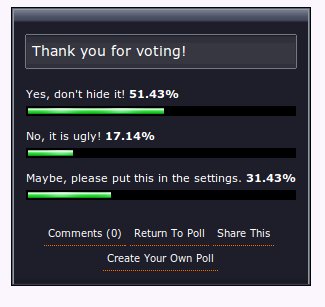
<p><a href="http://jerrywalsh.org/assets/uploads/2010/09/screenshot-6.png"><img class="none" src="http://jerrywalsh.org/assets/uploads/2010/09/screenshot-6.png" width="325" height="307" title="'drop the http from google chrome?'" ></a></p>

<p>Really?  You&#8217;d prefer to see the http:// stay?</p>

<p>In my opinion, <strong>dropping it</strong> is one of the <em>best damn things they have ever done </em>because in this day and age, it&#8217;s no longer necessary. It just doesn&#8217;t matter anymore because the web is all about http:// now. It&#8217;s implicit and the UI should mirror this - people don&#8217;t need to know about it. I recall <a href="http://jerrywalsh.org/quote-of-the-day-perfection-49.html">what my good friend anto once said</a>&#8230;</p>

<p>This is just one of the things which makes Chrome stand out from all the others, Jeff Atwood <a href="http://www.codinghorror.com/blog/2010/09/go-that-way-really-fast.html">recently wrote</a> that</p>

<blockquote>Chrome was a completely respectable browser in V1 and V2. The entire project has moved forward so fast that it now is, at least in my humble opinion, the best browser on the planet. Google went from nothing, no web browser at all, to best-of-breed in under two years.</blockquote>

]]></content>
  </entry>
  
  <entry>
    <title type="html"><![CDATA[HOWTO: Compile PDFlib for PHP on Linux]]></title>
    <link href="http://jerrywalsh.org/2010/compiling-pdflib-for-php-on-linux-0328.html"/>
    <updated>2010-03-28T13:00:35+01:00</updated>
    <id>http://jerrywalsh.org/2010/compiling-pdflib-for-php-on-linux</id>
    <content type="html"><![CDATA[<p>Here&#8217;s a small script which you can use to compile PDFlib support for PHP on Linux. This should work on any Debian based Linux distribution.</p>

<figure class='code'><figcaption><span></span></figcaption><div class="highlight"><table><tr><td class="gutter"><pre class="line-numbers"><span class='line-number'>1</span>
<span class='line-number'>2</span>
<span class='line-number'>3</span>
<span class='line-number'>4</span>
<span class='line-number'>5</span>
<span class='line-number'>6</span>
<span class='line-number'>7</span>
<span class='line-number'>8</span>
<span class='line-number'>9</span>
<span class='line-number'>10</span>
<span class='line-number'>11</span>
<span class='line-number'>12</span>
<span class='line-number'>13</span>
<span class='line-number'>14</span>
<span class='line-number'>15</span>
<span class='line-number'>16</span>
<span class='line-number'>17</span>
<span class='line-number'>18</span>
<span class='line-number'>19</span>
<span class='line-number'>20</span>
<span class='line-number'>21</span>
<span class='line-number'>22</span>
<span class='line-number'>23</span>
<span class='line-number'>24</span>
<span class='line-number'>25</span>
<span class='line-number'>26</span>
<span class='line-number'>27</span>
<span class='line-number'>28</span>
<span class='line-number'>29</span>
<span class='line-number'>30</span>
<span class='line-number'>31</span>
<span class='line-number'>32</span>
<span class='line-number'>33</span>
</pre></td><td class='code'><pre><code class='bash'><span class='line'><span class="c">#!/bin/sh</span>
</span><span class='line'><span class="c"># Download the PDFLib Lite Linux source from here first:</span>
</span><span class='line'><span class="c"># http://www.pdflib.com/download/pdflib-family/pdflib-lite-7/</span>
</span><span class='line'><span class="c"># put the download in the same location as this script</span>
</span><span class='line'><span class="c"># NOTE: you will be prompted by the pecl installation at the end</span>
</span><span class='line'><span class="c"># of the process for a path - you&#39;ll need to enter /usr/local/ here</span>
</span><span class='line'><span class="c">#</span>
</span><span class='line'><span class="c"># Author: jbw</span>
</span><span class='line'><span class="c"># DateCreated: Mon, 22 Mar 2010</span>
</span><span class='line'>
</span><span class='line'><span class="c"># We need root privileges ..</span>
</span><span class='line'><span class="k">if</span> <span class="o">[</span> <span class="s2">&quot;$USER&quot;</span> !<span class="o">=</span> <span class="s2">&quot;root&quot;</span> <span class="o">]</span>; <span class="k">then</span>
</span><span class='line'><span class="k">  </span>chmod +x <span class="s2">&quot;$0&quot;</span>
</span><span class='line'>  gksudo <span class="s2">&quot;$0&quot;</span>
</span><span class='line'>  <span class="nb">exit</span>
</span><span class='line'><span class="k">fi</span>
</span><span class='line'>
</span><span class='line'>dpkg -l | grep -q build-essential <span class="o">||</span> <span class="se">\</span>
</span><span class='line'>  apt-get install build-essential
</span><span class='line'>
</span><span class='line'>tar zxvf PDFlib-Lite-7*.tar.gz <span class="o">&amp;&amp;</span> <span class="se">\</span>
</span><span class='line'>  <span class="nb">cd </span>PDFlib-Lite-7*/ <span class="o">&amp;&amp;</span> <span class="se">\</span>
</span><span class='line'>  ./configure <span class="o">&amp;&amp;</span> <span class="se">\</span>
</span><span class='line'>  make <span class="o">&amp;&amp;</span> <span class="se">\</span>
</span><span class='line'>  make install
</span><span class='line'>
</span><span class='line'>dpkg -l | grep -q php-pear <span class="o">||</span> <span class="se">\</span>
</span><span class='line'>  apt-get install php-pear
</span><span class='line'>
</span><span class='line'>dpkg -l | grep -q php5-dev <span class="o">||</span> <span class="se">\</span>
</span><span class='line'>  apt-get install php5-dev
</span><span class='line'>
</span><span class='line'>pecl install pdflib
</span></code></pre></td></tr></table></div></figure>


<p>If you don&#8217;t plan on using the dl() method to load this module dynamically then you may need to modify the php configuration so it autoloads the pdf.so extension.</p>
]]></content>
  </entry>
  
  <entry>
    <title type="html"><![CDATA[Delaying/Ignoring Touchpad Taps while you're typing on Linux]]></title>
    <link href="http://jerrywalsh.org/2010/delayingignoring-touchpad-taps-while-youre-typing-on-linux-0321.html"/>
    <updated>2010-03-21T19:40:20+00:00</updated>
    <id>http://jerrywalsh.org/2010/delayingignoring-touchpad-taps-while-youre-typing-on-linux</id>
    <content type="html"><![CDATA[<p>Okay, so it may mean my typing posture is out of line but even so, it can be incredibly annoying if your thumb just happens to hit the touchpad on your laptop while you&#8217;re typing.</p>

<p>I&#8217;m using a Lenovo Thinkpad T400 which has a synaptics based touchpad. This fix only works if you&#8217;re using a synaptics based touchpad! If you&#8217;re not using a synaptic touchpad then this fix probably won&#8217;t work for you.</p>

<p>First off, we need to edit our xorg.conf at /etc/X11/xorg.conf. I appended the following to my file since I had not Mouse based input device section:</p>

<figure class='code'><div class="highlight"><table><tr><td class="gutter"><pre class="line-numbers"><span class='line-number'>1</span>
<span class='line-number'>2</span>
<span class='line-number'>3</span>
<span class='line-number'>4</span>
<span class='line-number'>5</span>
<span class='line-number'>6</span>
<span class='line-number'>7</span>
</pre></td><td class='code'><pre><code class=''><span class='line'>Section "InputDevice"
</span><span class='line'>Identifier  "Touchpad"
</span><span class='line'>Driver "synaptics"
</span><span class='line'>Option "Device" "/dev/psaux"
</span><span class='line'>Option "Protocol" "auto-dev"
</span><span class='line'>Option "SHMConfig" "on"
</span><span class='line'>EndSection</span></code></pre></td></tr></table></div></figure>


<p>if you have an input device section then you&#8217;ll need to ensure it features the same Option and Driver lines as above.</p>

<p>Once you&#8217;ve made these changes you&#8217;ll need to restart the X server. You can do this using</p>

<figure class='code'><div class="highlight"><table><tr><td class="gutter"><pre class="line-numbers"><span class='line-number'>1</span>
</pre></td><td class='code'><pre><code class=''><span class='line'>/etc/init.d/gdm restart</span></code></pre></td></tr></table></div></figure>


<p> or alternatively kill the X server using ctrl+alt+backspace and let gdm bring it back up. BEFORE we restart the X server, let&#8217;s setup a tapping delay. I created a xinitrc file at ~/.xinitrc and put the following in it:</p>

<figure class='code'><div class="highlight"><table><tr><td class="gutter"><pre class="line-numbers"><span class='line-number'>1</span>
<span class='line-number'>2</span>
</pre></td><td class='code'><pre><code class=''><span class='line'>pgrep syndaemon &gt; /dev/null &amp;&amp; killall syndaemon
</span><span class='line'>syndaemon -i 0.5 -d</span></code></pre></td></tr></table></div></figure>


<p>You can experiment with different delays once you&#8217;ve restarted your X server by executing the two lines above from within your .xinitrc (or simply re-execute ~/.xinitrc). Half a second turned out to be the perfect delay for me but it&#8217;s entirely down to your own preferences.</p>

<p>Have fun!</p>
]]></content>
  </entry>
  
  <entry>
    <title type="html"><![CDATA[How to completely remove Pulseaudio Server from Karmic Koala]]></title>
    <link href="http://jerrywalsh.org/2010/how-to-completely-remove-pulseaudio-server-from-karmic-koala-0315.html"/>
    <updated>2010-03-15T21:39:31+00:00</updated>
    <id>http://jerrywalsh.org/2010/how-to-completely-remove-pulseaudio-server-from-karmic-koala</id>
    <content type="html"><![CDATA[<p>I don&#8217;t think I&#8217;ll ever understand why Ubuntu is becoming increasingly attached to Pulseaudio. While I appreciate the neat things you can do with it, I&#8217;ve had NOTHING but problems when using it in conjunction with voip/sip applications such as Ekiga (or zoiper). Don&#8217;t get me wrong, I have tried to make friends with it. I once wasted the best part of half a day trying to come up with some form of a pulseaudio configuration that produced even semi-decent results with voip applications.  It was all in vein and so it had to go -
I removed Pulseaudio and everything worked, perfectly. That was in Juanty, but things were different now since I&#8217;d just upgraded to Ubuntu 9.10 aka Karmic Koala.  Having upgraded, I quickly went to remove my arch enemy, otherwise known as Pulseaudio.  Things unfortunately didn&#8217;t work out to well, since it seems a portion of the sound applications and applets are now dependant on Pulseaudio. So I tried yet again to make friends and still conclude Pulseaudio is an epic failure.</p>

<h2>What happens if you remove Pulseaudio on Karmic Koala?</h2>


<p>Removing Pulseaudio in Karmic means you lose some sound related gnome goodness. You lose the volume control applet (aka speaker icon) and the hardware keyboard volume control keys stop working too. The OSD that normally displays when you volume up/down/mute also disappears. Really, I didn&#8217;t care about this loss, since I never use the graphical mixer anyway - that&#8217;s kinda the point of having the hardware volume keys, isn&#8217;t it ? The OSD is just bling, and I could live without it as long as I could just get the hardware keys working.</p>

<h2>Instructions for removing Pulseaudio from Karmic Koala</h2>


<p>And so here&#8217;s what I ended up with - hardware keys work and the increment/decrement of the up/down buttons is now configurable. I don&#8217;t have an OSD and I don&#8217;t have gnome sound volume control applet anymore. If like me, you want to remove Pulseaudio no matter what, then follow these very gratifying steps:</p>

<h3>Step 1.Uninstall PulseAudio</h3>


<p>Use Synaptic via <em>System » Administration » Synaptic Package Manager</em> or <code>sudo apt-get remove --purge pulseaudio </code> from the shell</p>

<h3>Step 2. Disable the gnome keyboard volume related shortcuts</h3>


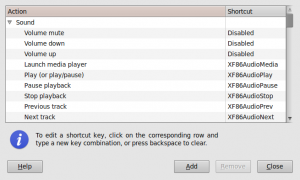
<p>Disable the gnome keyboard volume related shortcuts since they are pulseaudio dependent and will no longer work. Go to <em>System »Preferences »  Keyboard Shortcuts </em> and disable the three volume shortcuts (up, down and mute). You can disable a shortcut by clicking on the line and then pressing the backspace key (i.e. backspace, NOT the key on your keyboard labeled &#8216;delete&#8217;)</p>

<p><a href="http://jerrywalsh.org/assets/uploads/2010/03/screenshot-3.png"><img class="center" src="http://jerrywalsh.org/assets/uploads/2010/03/screenshot-3-300x180.png" width="300" height="180" title="screenshot-3" ></a></p>

<h3>Step 3. Configure your own keybindings to control the hardware volume keys.</h3>


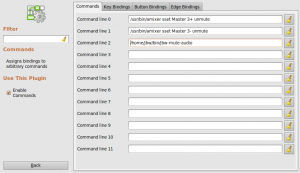
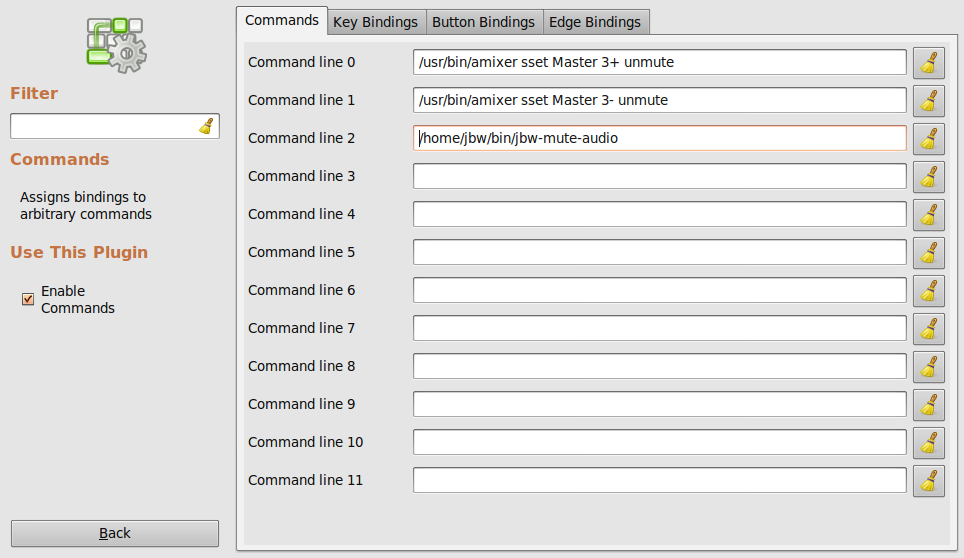
<p>I use compiz, so I opted to setup custom commands with custom keyboard bindings using the compizconfig settings manager. If you don&#8217;t use compiz, then you&#8217;ll need to configure the keybindings in whatever you use. If you are using compiz go to <em>System »    Preferences »    CompizConfig Settings Manager</em>. Then go to <em>Commands</em>
and setup your keybindings like this:</p>

<p><a href="http://jerrywalsh.org/assets/uploads/2010/03/screenshot-1.png"><img class="center" src="http://jerrywalsh.org/assets/uploads/2010/03/screenshot-1-300x173.png" width="300" height="173" title="screenshot-1" ></a></p>

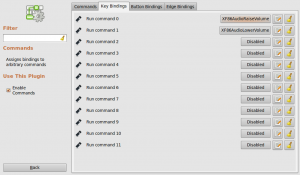
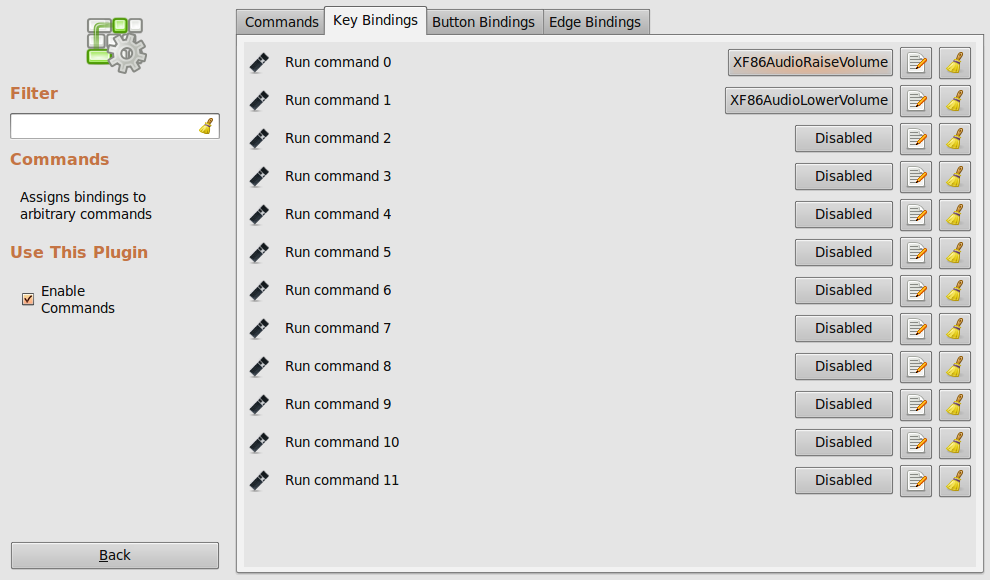
<p>Keep in mind you can easily attach these commands to edge or button bindings too. Keyboard bindings is all I wanted thou:</p>

<p><a href="http://jerrywalsh.org/assets/uploads/2010/03/screenshot-2.png"><img class="center" src="http://jerrywalsh.org/assets/uploads/2010/03/screenshot-2-300x175.png" width="300" height="175" title="screenshot-2" ></a></p>

<p>The jbw-mute-audio is a small shell script which uses amixer to check whether the audio is muted or not and then mutes/unmutes accordingly:</p>

<pre>#!/bin/sh
# Mute or unmute
# jbw Mon, 08 Feb 2010
(amixer sget Master  | grep '\[off\]'  &amp;&amp; amixer sset Master unmute) \
    || amixer sset Master mute</pre>


<p>Save the above script and customize it accordingly (man amixer). Don&#8217;t forget to chmod the script so it&#8217;s executable.</p>

<p>That&#8217;s it! Enjoy life without Pulseaudio woes!</p>
]]></content>
  </entry>
  
  <entry>
    <title type="html"><![CDATA[Meteor is working once again]]></title>
    <link href="http://jerrywalsh.org/2009/meteor-is-working-once-again-0827.html"/>
    <updated>2009-08-27T21:02:29+01:00</updated>
    <id>http://jerrywalsh.org/2009/meteor-is-working-once-again</id>
    <content type="html"><![CDATA[<p>Okay.. it took awhile, but Meteor support in TextBuddy is back once again! If you have the latest version of the software it&#8217;ll just start working automatically.</p>

<p>Have fun!</p>
]]></content>
  </entry>
  
  <entry>
    <title type="html"><![CDATA[MyMeteor is down!]]></title>
    <link href="http://jerrywalsh.org/2009/mymeteor-is-down-0805.html"/>
    <updated>2009-08-05T22:06:07+01:00</updated>
    <id>http://jerrywalsh.org/2009/mymeteor-is-down</id>
    <content type="html"><![CDATA[<p>I&#8217;m not sure how long it&#8217;s been this way but it&#8217;s damn annoying. MyMeteor&#8217;s been down all weekend due to &#8220;maintenance&#8221; and when I checked just now it&#8217;s still down!</p>

<p style="text-align: center;"><img class="center" src="http://jerrywalsh.org/assets/uploads/2009/08/mymeteor-503-service-temporarily-unavailable.png" title="mymeteor-503-service-temporarily-unavailable" ></p>


<p>What kind of maintenance lasts 96 hours anyway? Couldn&#8217;t they leave the old site in place until they&#8217;re ready to launch the updated version? It bamboozles me how companies of this size can get away with this kind of thing.</p>
]]></content>
  </entry>
  
  <entry>
    <title type="html"><![CDATA[My desktop evolves..]]></title>
    <link href="http://jerrywalsh.org/2009/my-desktop-evolves-0804.html"/>
    <updated>2009-08-04T16:31:19+01:00</updated>
    <id>http://jerrywalsh.org/2009/my-desktop-evolves</id>
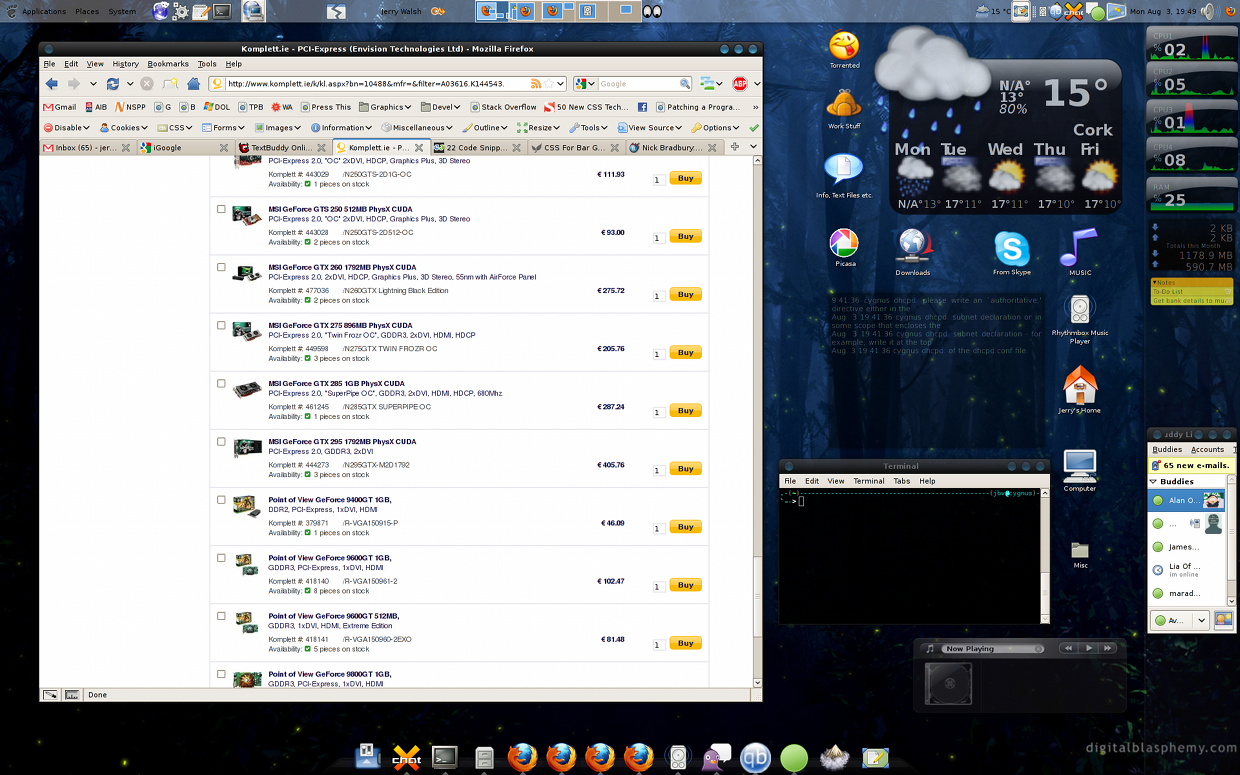
    <content type="html"><![CDATA[<p>Over the last few weeks I&#8217;ve plunged head first in to using Linux as my primary desktop OS.  Since then, my desktop has evolved from the standard Debian Gnome configuration to <em>my</em> configuration. With this new desktop, things are approached a little differently when compared with my old Windows setup.  The avant-window-manager (dock) replaces the Windows taskbar. The Windows Start Menu and Quick Launch toolbar are replaced by the main Gnome panel, which sits at the top of the screen. I have added a bunch of applets to this panel, such as Terminal Services Client launcher, force quit a troublesome X process, user switcher, workspace switcher, some erm, eyes, local weather, show desktop and a volume control.  I have a whole bunch of screenlets running too, they provide the opaque desktop widgets that you see in the screenshot.</p>

<p>Having used this configuration for the last few weeks, things have now evolved a little further.  The folder layout on *nix machine &#8220;feels right&#8221; compared with Windows. All of &#8220;your stuff&#8221; is stored in your home directory &#8211; which means that there&#8217;s less emphasis on &#8220;the desktop&#8221;, giving me the opportunity to easily keep it organised.  Grouping all current desktop icons into logical groups (directories), I arranged them around my screenlets. I figured this is the best approach since all the useful bits (screenlets and icons) are all in one place. I disabled the nautilus (using gconf -&gt; apps &gt; nautilus &gt; desktop preferences) desktop trash icon since I have a screenlet taking its place instead.</p>

<p><a href="http://jerrywalsh.org/assets/uploads/2009/08/jerrys-desktop-screenshot-compiz-and-gnome-linux-debian-lenny-1024.png"><img class="center" src="http://jerrywalsh.org/assets/uploads/2009/08/jerrys-desktop-screenshot-compiz-and-gnome-linux-debian-lenny-1024-300x187.png" width="300" height="187" title="jerrys-desktop-screenshot-compiz-and-gnome-linux-debian-lenny-1024" ></a></p>

<p><a href="http://jerrywalsh.org/assets/uploads/2009/08/jerrys-desktop-screenshot-compiz-and-gnome-linux-debian-lenny-1024.png"></a>My only regret now is that when I built this machine I went with an ATI graphics card. ATI&#8217;s Linux support sucks, the official proprietary drivers (the dreaded &#8220;fglrx&#8221;) suck and the opensource radeon/radeonhd drivers aren&#8217;t much better.  Video performance is now the only major bottleneck on this machine and to &#8220;solve it&#8221; I decided I&#8217;d live with some high quality albeit closed-source drivers from nVidia &#8211; an <a href="http://www.komplett.ie/k/ki.aspx?sku=444954">nVidia GTS 250</a> is on its way to me as I type.</p>

<p style="text-align: center;"></p>

]]></content>
  </entry>
  
  <entry>
    <title type="html"><![CDATA[Textbuddy v1.1.42 has been released! Get it while it's hot!]]></title>
    <link href="http://jerrywalsh.org/2009/textbuddy-v1142-has-been-released-get-it-while-its-hot-0802.html"/>
    <updated>2009-08-02T18:19:36+01:00</updated>
    <id>http://jerrywalsh.org/2009/textbuddy-v1142-has-been-released-get-it-while-its-hot</id>
    <content type="html"><![CDATA[<p>This is probably the most major release of TextBuddy in quite sometime.</p>

<p>Many things have changed under the hood, in addition, it handles larger multiline texts much more gracefully, and also remembers the last window size and position. I discovered that Vodafone support was broken for quite sometime (as a result of a recent vodafone.ie update) this is now working again.</p>

<p>Get it while it&#8217;s hot - you can <a href="http://jerrywalsh.org/download.php?download=textbuddySetup.exe">download it here</a>.</p>
]]></content>
  </entry>
  
  <entry>
    <title type="html"><![CDATA[Firefox reaches new milestone!]]></title>
    <link href="http://jerrywalsh.org/2009/firefox-reaches-new-milestone-0802.html"/>
    <updated>2009-08-02T13:00:22+01:00</updated>
    <id>http://jerrywalsh.org/2009/firefox-reaches-new-milestone</id>
    <content type="html"><![CDATA[<p>Firefox downloads have now reached 1 billion, or 31% of the web browser market share. Quite an amazing achievement for this <a href="https://addons.mozilla.org/">community effort</a>, <a href="http://www.getfirefox.org/">opensource WebBrowser</a>. It has even <a href="http://gizmodo.com/5315634/us-state-department-rejects-firefox-which-is-entirely-free-due-to-expense-questions">attracted attention from the US Secretary of State</a>.</p>

<p>The big thorn in the heel for WebDevelopers, Internet Explorer still remains at large with a 60% holding while Opera, Chrome and Safari are all below 5%.</p>
]]></content>
  </entry>
  
  <entry>
    <title type="html"><![CDATA[How to resolve - Error: shared library "svn_client-1" does not exist]]></title>
    <link href="http://jerrywalsh.org/2009/error-shared-library-svn_client-1-does-not-exist-0729.html"/>
    <updated>2009-07-29T11:16:03+01:00</updated>
    <id>http://jerrywalsh.org/2009/error-shared-library-svn_client-1-does-not-exist</id>
    <content type="html"><![CDATA[<p>While attempting to upgrade to the latest version of <a href="http://trac.edgewall.org/">Trac</a> from the <a href="http://www.freebsd.org/ports/">FreeBSD ports</a> you may encounter the above error.  Finding a solution for this problem isn&#8217;t as easy as it may seem and so I decided I&#8217;d put it here to help out a few lost souls.</p>

<p>If you receive this error then it&#8217;s most likely that you&#8217;ve built subversion with the STATIC make option. Building a static version means that no shared libraries will be built and this is the reason you get the svn_client-1 does not exist error. The solution is to:</p>

<p><code> cd /usr/ports/devel/subversion &amp;&amp; make config</code></p>

<p>Ensure you untick the STATIC option then rebuild and reinstall the subversion port. Once you&#8217;ve done this you can return to your trac build and live in happiness once again.</p>
]]></content>
  </entry>
  
  <entry>
    <title type="html"><![CDATA[After 2 months waiting, it's finally here...]]></title>
    <link href="http://jerrywalsh.org/2009/after-2-months-waiting-its-finally-here-0716.html"/>
    <updated>2009-07-16T20:59:04+01:00</updated>
    <id>http://jerrywalsh.org/2009/after-2-months-waiting-its-finally-here</id>
    <content type="html"><![CDATA[<p>I&#8217;ve been waiting over two months and today, I finally received the phonecall saying the courier would deliver it &#8211; my <a href="http://embody.hermanmiller.com">Embody chair from Herman Miller</a>.</p>

<p>For the last 5-6 months I have been sitting in something quite like this:</p>

<p><img class="center" src="http://jerrywalsh.org/assets/uploads/2009/07/wi-53624-l-237x300.jpg" width="237" height="300" title="wi-53624-l" >This is my upgrade:</p>

<p><img class="'size-medium right'" src="http://jerrywalsh.org/assets/uploads/2009/07/image162-200x300.jpg" width="200" height="300" title="image162" ><img class="center" src="http://jerrywalsh.org/assets/uploads/2009/07/image161-200x300.jpg" width="200" height="300" title="image161" ></p>

<p>It&#8217;s early days yet as I&#8217;m still getting used to all the adjustable bits.. but it&#8217;s very, very comfortable.</p>
]]></content>
  </entry>
  
  <entry>
    <title type="html"><![CDATA[Ohhh.. Nmap 5.00 Released]]></title>
    <link href="http://jerrywalsh.org/2009/ohhh-nmap-500-released-0716.html"/>
    <updated>2009-07-16T20:18:51+01:00</updated>
    <id>http://jerrywalsh.org/2009/ohhh-nmap-500-released</id>
    <content type="html"><![CDATA[<p><strong>July 16, 2009</strong> &#8211; Insecure.Org is pleased to announce the immediate,  free availability of the Nmap Security Scanner version 5.00 from <a href="http://nmap.org/">http://nmap.org/</a>. This is the first stable release since 4.76 (last September), and the first major
release since the 4.50 release in 2007.  Dozens of development releases led up to this.</p>

<p>Considering all the <a href="http://nmap.org/5/#5changes">changes</a>, we consider this the most important Nmap release since 1997, and we recommend that all current users upgrade.</p>
]]></content>
  </entry>
  
</feed>